
Renting an LED screen for your event sounds simple until you are standing in a venue explaining to your vendor why the screen they delivered looks wrong for the space. Too small and your audience is straining from the back rows. Too large and it overwhelms the stage, blows the budget, and creates lighting problems you never planned for.
Choosing the right LED screen rental size for your event is not guesswork but a decision with clear logic behind it. This guide walks you through exactly how to make that call, whether you are planning a corporate conference, a product launch, an award night, or an outdoor activation in Lagos.
Why Size Is the Wrong Place to Start
Most people approach LED screen rental by asking “what size do I need?” before they have answered the questions that actually determine the answer. Screen size is an output, not a starting point. The right starting point is your venue.
Before you speak to any rental vendor, you need to know three things: the dimensions of your venue, the distance between your screen and your furthest seated guest, and the purpose the screen will serve during the event. These three factors determine everything else.
A screen that works perfectly in a 200-capacity banquet hall will be inadequate in an outdoor arena. A screen sized for a product showcase will be too detailed for a stage backdrop. Get clear on these specifics first.
Understanding Pixel Pitch and Why It Matters
If you have looked at LED screen rental quotes in Lagos, you have likely seen terms like P3, P4, or P6. These refer to pixel pitch and that’s the distance in millimetres between each LED cluster on the screen. It is the single most important technical factor in choosing the right screen for your event.
A lower pixel pitch number means the LEDs are closer together, which produces a sharper, more detailed image. A higher pixel pitch means the LEDs are further apart, which is fine at a distance but looks grainy up close.
P2–P3 screens are best for close-viewing environments like conference rooms and exhibition booths where guests are within 3–5 metres of the screen.
P4–P5 screens work well for mid-size indoor events like corporate conferences and product launches where viewing distances range from 5–12 metres.
P6 and above suits large outdoor events where the audience is spread across a wide area and viewing distances exceed 12 metres.
A common and costly mistake is renting a high pixel pitch screen for an indoor conference to save on cost. The result is a pixelated image that makes your brand materials look unprofessional at close range.
The Viewing Distance Formula
There is a simple industry rule of thumb: multiply your pixel pitch by 10 to get the minimum comfortable viewing distance in metres. A P4 screen has a minimum comfortable viewing distance of roughly 4 metres.
For maximum viewing distance, divide your screen height in metres by 0.087. A 3-metre tall screen works well for audiences up to approximately 34 metres away.
Ambient light, screen brightness, and content type all affect perceived image quality but these numbers give you a reliable starting point when briefing your vendor.
Matching Screen Size to Event Type
Corporate Conferences and Town Halls
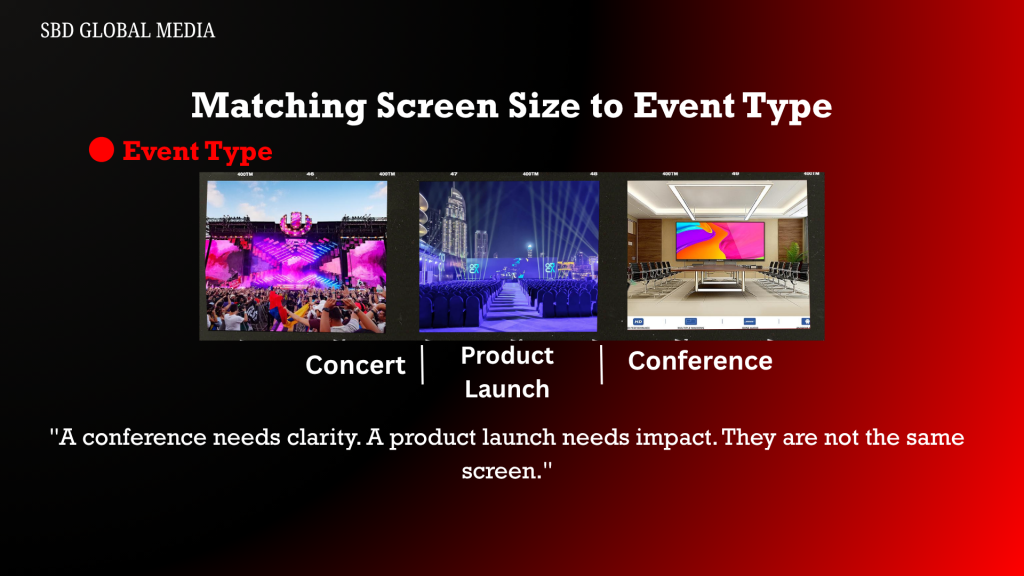
For a conference in a standard hotel ballroom or event centre in Lagos, a screen width of 4–6 metres works well for audiences of 150–400 guests. The priority is readability, slides, data charts, and speaker names on lower thirds must be legible from the back row.
If your conference runs breakout sessions in smaller rooms, consider separate smaller screens for those spaces.
Product Launches and Brand Activations
Product launches demand visual impact above readability. A wider backdrop configuration that’s 6–8 metres wide with a low pixel pitch screen (P3 or P4) delivers the image quality your brand visuals require at most mid-size Lagos venues.
Award Ceremonies and Gala Dinners
Award nights often need dual screens flanking the stage so that guests seated at round tables can see the screen regardless of where they are positioned in the room. Two screens of 3–4 metres each, placed at angles to the stage, typically serve this layout better than one large central screen.
Outdoor Events and Concerts
Outdoor LED screen rental in Lagos requires screens with higher brightness output which are measured in nits to compete with ambient daylight. A screen that looks vivid indoors can appear dim and washed out outside during the day. Confirm with your vendor that the screen’s brightness spec is rated for outdoor daytime use, not just indoor environments.
Other Factors That Affect Your Choice
Viewing angle matters in venues where guests are seated widely to the sides. Most quality LED panels have a horizontal viewing angle of 140 degrees or more so confirm this for your specific rental.
Content type affects the spec you need. For video and motion graphics, brightness and refresh rate matter as much as pixel pitch. For slides and static graphics, pixel pitch is the priority.
Rigging and installation constraints may limit how large a screen can be installed. Some venues in Lagos have ceiling height restrictions or structural limitations. Raise this with your vendor during planning, not on setup day.
Power requirements for large LED screens are significant. For outdoor events especially, confirm that your generator can meet the draw of the screen alongside your other technical equipment.
Questions to Ask Your LED Screen Rental Vendor
Before you confirm any rental, get clear answers on these:
- What is the pixel pitch of the screen being supplied?
- What is the brightness rating, and is it suitable for my environment?
- What is the maximum and minimum viewing distance for this screen?
- What are the power requirements and what included in the setup?
- Is a technician on-site for the duration of the event?
- What is the contingency plan if a panel fails during the event?
That last question matters most. LED screens are modular, individual panels can fail mid-event. A professional rental vendor should always have spare panels on-site and a technician present who can swap them out without disrupting the event.
Putting It All Together
Choosing the right LED screen size comes down to knowing your venue, audience, content, and viewing distances before comparing options. A vendor who quotes you a screen size without asking about those factors first is not giving you the right guidance.
If you are building out the full technical picture for your event, our guide on what event coverage actually includes is a useful starting point. LED screens sit within a broader production setup, and understanding how the pieces connect helps you brief vendors more effectively. And if live streaming is also part of your plan, our guide on how to live stream a corporate event covers how to integrate that with your on-ground production.
The right screen does not just display content. It shapes how your audience experiences the entire event.
Planning an event in Lagos and need LED screen rental with professional setup and on-site support? Contact SBD Global to discuss your requirements.